
Searching for a Warrant in Coryell County
No Coryell County public portal combines the sheriff, JP courts, municipal courts, County Court at Law, and district records. Use the citation or cause paperwork to choose a court. If the person is currently in custody, the sheriff's Jail Roster is relevant; it is not a list of unserved warrants.
Gather the case or citation number, the court name, date of birth where the official form asks for it, and the approximate setting date. Search only a person's own record or help a family member. Confirm any match with the clerk or issuing court before acting.
- Use the Copperas Cove court portal only if the citation names that city court.
- For a Gatesville or Evant citation, contact that municipal clerk; neither has a complete public warrant-search form in the reviewed sources.
- For a precinct citation, call the JP named on the paperwork. Payment links for JP3 and JP4 are not warrant searches.
- Call the sheriff at 254-865-7201 for county enforcement routing, or submit a narrow written request to its Records Clerk.
- For a DPS FTA/FTP hold, contact each reporting court; DPS staff cannot confirm an arrest warrant.
Coryell County Warrant Search Routes by Court
The official county sheriff pages link a Jail Roster and a written records-request route, but no active-warrant search was found in the review dated September 20, 2026. The roster is described as real-time for custody. That timing does not apply to warrant status. Call the sheriff and ask which court issued the process, then contact that court for the current file.
For city tickets, the city court is often the fastest route. For County Court at Law misdemeanors, ask the County Clerk's criminal division. District felonies route through the District Clerk or the 52nd or 440th court coordinator. Each office answers for its own file.
Warrant Search Fields Explained
The only detailed public search form captured is the Copperas Cove Municipal Court citation portal. It exposes several ways to find a city citation, but it does not label itself a county warrant index. Required-field rules and exact-match behavior were not published in the reviewed fetch.
| Field Label | Type | Required | Notes |
|---|---|---|---|
| Citation number + DOB | Text and date | Not stated | DOB format shown as MM/DD/YYYY; exact citation format not stated. |
| Driver license + state + DOB | Text and dropdown | Not stated | State choices are listed; no countywide coverage is implied. |
| Social Security number + DOB | Sensitive text and date | Not stated | Use only for the requester's own case. |
| Vehicle plate + state | Text and dropdown | Not stated | A citation clue does not establish current warrant status. |
| First and last name + DOB | Text and date | Not stated | No partial-match rule or result schema was published. |
| Business name | Text | Not stated | Portal option only; not a reason to search or publish unrelated records. |
Coryell County Copperas Cove Warrant Portal Walkthrough
Match the search mode to the number on the person's own citation. A citation lookup pairs the citation number with date of birth. A driver's-license lookup asks for the state and date of birth. Name search uses first name, last name, and date of birth. Vehicle search uses plate and state; business search uses a business name.
The interface also offers an SSN and date-of-birth route. That field is sensitive. Do not enter another person's SSN. The portal shows Sign In and Register controls, but the reviewed search page displayed the public controls without a completed result. It gave no update time, partial-match rule, or warrant-only filter.
Open the Copperas Cove court search for its current controls. A result is a citation or violation clue, not a confirmation of an active county arrest warrant.
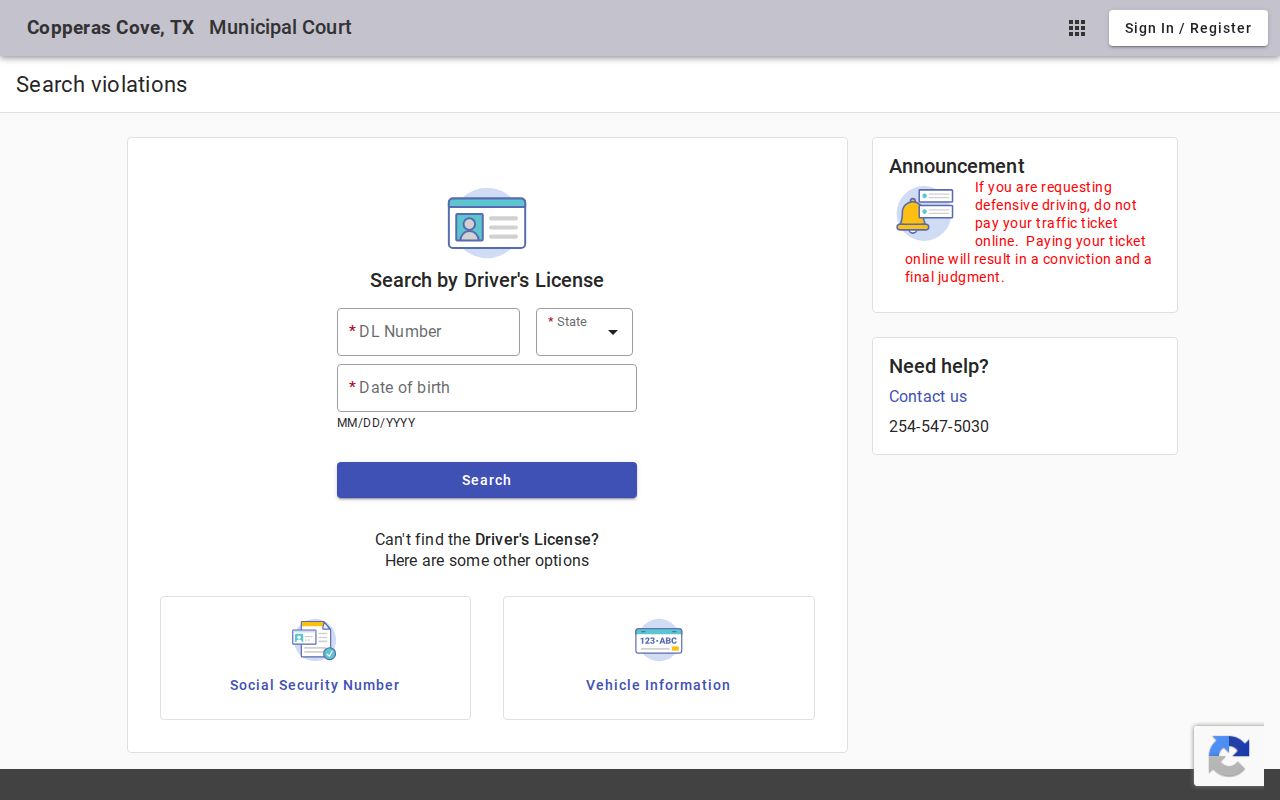
The captured page shows search choices, not a person's result. The municipal clerk confirms what any match means.
What a Warrant Search Shows
Coryell County has no public sample warrant row, published number format, or status-code guide. The Copperas Cove portal is citation based, and the Gatesville docket page exposes headings rather than a complete searchable warrant record. Treat a visible match as a lead for the court clerk to verify.
| Warrant or case number | Local format not published Ask whether the warrant and cause numbers differ. |
|---|---|
| Charge / offense | Read the charge label on the official case record; no private sample was copied. |
| Issuing court | Confirm city, JP, County Court at Law, district, or federal venue with the clerk. |
| Bond / balance | No universal Coryell bond amount was found. Ask for each fee or balance by type. |
| Status | Ask the clerk to define active, served, returned, recalled, or quashed. |
Coryell County Warrant Search Jail Roster Is Custody Only
The sheriff's FAQ says the Jail Roster is updated in real time, but describes custody information. It does not say that every person with an unserved warrant appears there. A person who is absent may have a city, JP, district, sealed, or otherwise nonpublic process. A person who appears may be in custody for a reason the roster does not explain fully.
Use the roster only for the custody question. For an unserved county warrant, call the Sheriff's Office. For a city or JP case, ask the issuing clerk. A blank roster is not a “no warrant” result.
Where to Check Warrants in Coryell County
Municipal clerks keep city citations; JP clerks hold precinct traffic and fine-only files; the County Clerk's criminal division routes County Court at Law misdemeanor records; and the District Clerk routes the 52nd and 440th District Courts. The sheriff handles county enforcement and custody routing. No one public search joins those channels.
Texas has no single public statewide warrant portal. DPS's FTA/FTP program tracks court-reported citation compliance and license-renewal holds, not all arrest warrants. A federal question belongs with the Waco Division court or federal counsel. The issuing court remains the place to confirm status.
Coryell County Warrant Searches Follow Different Clerks
The County Clerk criminal page identifies the Misdemeanor Records Division as the route for County Court at Law Class A and B records and says that division supports warrant issuance. The District Clerk holds judicial records for the 52nd and 440th District Courts. JP and municipal clerks hold their own Class C and citation files.
Ask for the cause or citation number and current setting. Do not ask one clerk to certify that no warrant exists in another court's file. The Texas judicial directory can help identify the court and its published contact, but it is not a live docket.
Restricted Warrants and Access Rules
The Texas Public Information Act gives access to many government records, but criminal procedure and judicial-record rules can control warrant material. Juvenile arrest warrants are confidential under Family Code Section 58.010. Sealing and active-investigation rules can limit access as well. A clerk may redact or withhold a record after applying the law to that request.
Key Rules:
Article 15.26 and Rule 12 can affect public access to arrest-warrant material.
Family Code Section 58.010 protects juvenile arrest-warrant records.
A blank search may reflect another court, a sealed record, or an unserved process; confirm with the issuing court.
Coryell County Blank Warrant Searches Need Follow-Up
A citation portal may return no match because the wrong identifier was entered, the case is held elsewhere, or the record is outside its coverage. The sheriff's roster may be empty because it is a custody list. Neither result answers whether a court has issued a process that is not shown publicly.
Call the court named on the paperwork and ask whether the case is pending, in FTA status, a bench or arrest warrant, or a capias pro fine. Ask for the court's next step in writing. If there is no paperwork, call the sheriff for county routing, then identify the issuing court.